
Project management
An assistant that reads along with your projects
Project leads spend a large part of their time on reports, follow-ups and compiling status. An AI project assistant takes exactly that over – from plans, tickets, minutes and e-mails – and leaves you the time for decisions.
Capabilities
What the project assistant takes over
The data is there – in Planner, Project, Jira, time tracking and Teams. The assistant turns it into status, risks and tasks.
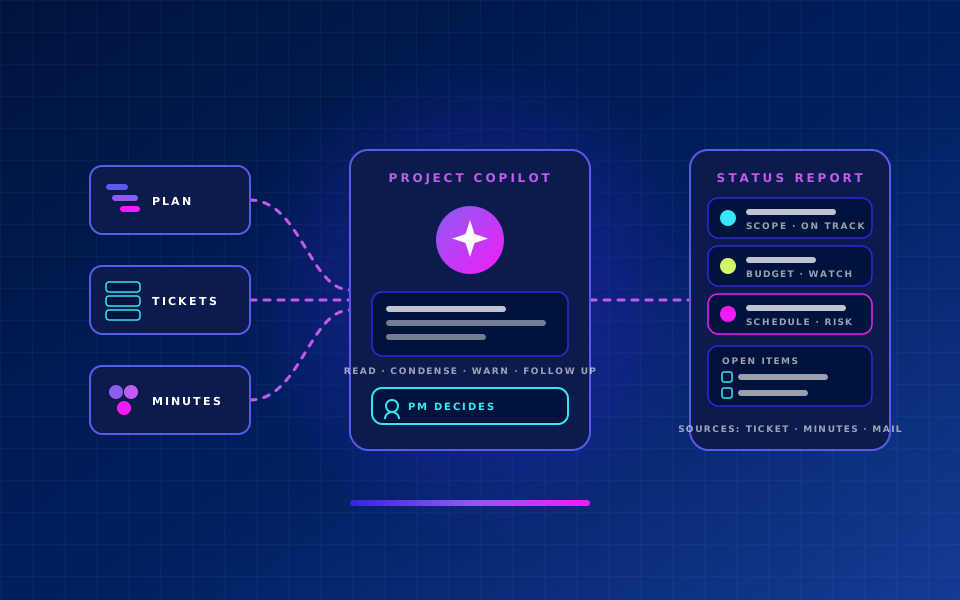
Status report at the push of a button
Progress, milestones, budget – from the data, not from follow-ups.
Early risk detection
Delays, extra effort and dependencies before deadlines slip.
Meeting minutes and tasks
Decisions and to-dos from Teams meetings captured and assigned.
Follow-up of open items
Remind, escalate, summarise the state for steering committees.
Resource and schedule scenarios
Capacity and sequence, aligned with absences and skills.
Budget and effort control
Time bookings and invoices against plan – deviations visible early.
Stakeholder communication
Updates for customers and management prepared, in your tone of voice.
Portfolio cockpit for the PMO
All projects with indicators, trends and reasons in one view.
Principle: the assistant proposes, the project lead decides. Every report and every risk assessment shows its sources – ticket, minutes, time booking or e-mail.
How it works
Read, condense, warn, follow up
The assistant works in the background with the tools your teams already use.
- 01
Read
Plans, tickets, time bookings, minutes and e-mails
- 02
Condense
Status, progress and deviations per work package
- 03
Warn
Risks and decisions needed before deadlines slip
- 04
Follow up
Tasks, reminders and escalation until completion
Tools
Integrated into your project teams' tools
No new tool nobody maintains – the assistant works in Microsoft 365, Jira and your ERP.
Microsoft 365 Copilot
Summaries in Teams meetings, reports in Word and PowerPoint, Copilot Studio agents with access to project data.
Planner, Project & Loop
Tasks, schedules and project documentation in the Microsoft ecosystem – connected with Power Automate.
Jira, Azure DevOps & Co.
Development-related projects: tickets, sprints and releases connected via n8n or native connectors.
Time tracking & ERP
Efforts, budgets and invoices from ERP and time tracking – project controlling without copying.
Benefits
What changes for project leads and the PMO
Less reporting work, earlier decisions, traceable assessments.
Less reporting effort
Status reports emerge from the data, not from follow-ups – minutes instead of hours per week.
Earlier decisions
Risks become visible while there is still room to act.
Relieved teams
Fewer status meetings, clearer tasks, fewer follow-ups.
Traceable assessments
Every statement with its source – for steering committees, customers and audit.
For whom
From SMEs to public administration
Projects differ, reporting work does not.
SMEs
Run projects professionally without a dedicated PMO – with an assistant instead of additional staff.
Manufacturing industry
Engineering, plant and rollout projects with many participants and hard deadlines.
Financial services
Regulatory and IT projects with documentation duties and an audit trail.
Public administration
Initiatives with many stakeholders, deadlines and reporting obligations.
Which project should the assistant read first?
We start with a pilot project, connect the existing tools and deliver the first automatic status report within a few weeks.